Block Blast Solver Comparison
Last updated:
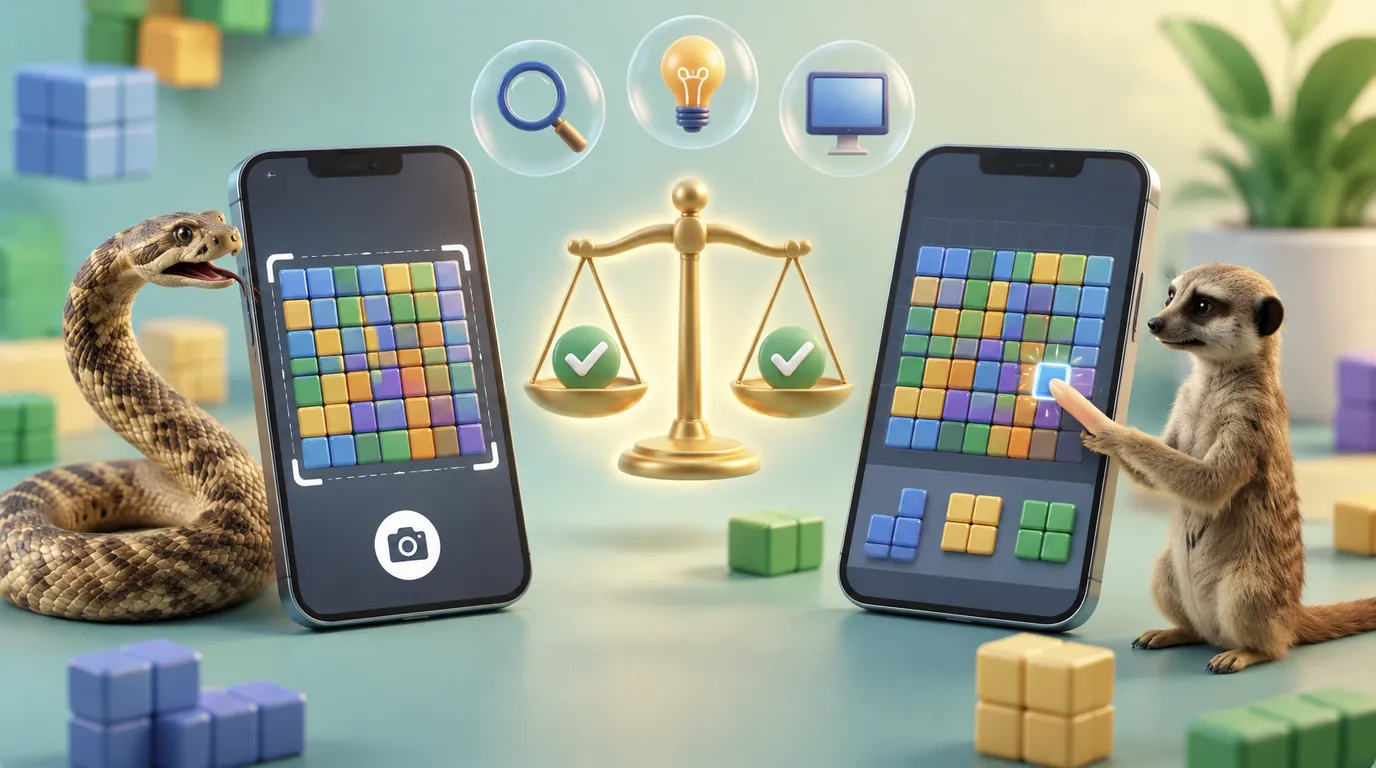
When you compare solvers, more than one feature matters. A screenshot tool is useful when you want to work directly from your current board. Manual input is useful when you want to recreate a position yourself, cell by cell. Other real differences include how well a tool reads the board, whether it explains its suggested move, what devices it works on, and how clearly it presents the final result.
A fair comparison focuses on what each tool actually does, not on a marketing line that cannot be checked. If you are wondering whether using one is fair play at all, our Block Blast cheat guide covers that question.
Screenshot Input
A screenshot based tool starts from an image of your current board. How useful the result is depends heavily on whether that image is clear enough to identify the grid and every available piece correctly.
When you are comparing tools, check whether each one lets you review or correct the detected board before you follow its suggestion. It is one of the most useful features to look for.
Manual Input
Manual input lets you recreate your board directly, without depending on image recognition at all. This is useful for testing a specific position you are curious about, or for fixing a board that a screenshot tool read incorrectly the first time.
Some players prefer manual input by default, simply because it removes the image recognition step from the process entirely.
Move Evaluation
Two different tools can both return a suggested move while using completely different reasoning to get there. Where possible, look for a tool that explains what it actually considered. Legal placement, whether a line clears, how much open space remains, and what the board looks like right after the move are the factors worth seeing spelled out.
A tool that only shows a move with no reasoning behind it is harder to trust and harder to learn from.
Accuracy and Verification
A useful solver makes it easy to notice when the detected board does not match your real position. A single wrong cell or a misread piece can change the entire recommendation, which is exactly why verification matters as much as detection itself.
Before following any suggested move, compare what the tool detected against what is actually on your screen. This one habit can stop a bad recommendation before it reaches your board.
Ease of Use
Look at how many steps stand between you and an actual result. A clean process looks like this. Upload or enter your board, check the detected position for accuracy, then view the recommended placement.
Mobile and Desktop Use
Because Block Blast is a mobile game on iOS and Android, device support matters. A browser based solver can also be useful when you want to switch between playing on your phone and checking a position on a larger desktop screen.
Manual Solver Versus Screenshot Solver
A screenshot solver is the more convenient choice when your current board is already sitting on your screen in front of you. Manual input is the better choice when you want direct, precise control over every single cell and piece.
Neither approach is automatically better than the other. The right choice depends on the situation you are actually in, not on which method sounds more advanced.
What Makes a Solver Useful?
A useful tool makes a confusing board easier to understand, shows a practical next move, and helps you verify that its recommendation actually matches your real position before you act on it.
A strong comparison between tools should focus on that kind of clarity and everyday usefulness, rather than a simple claim that one tool is the best without anything to back it up.
Comparing Detection Quality
Detection quality is the part of a solver that is easiest to overstate and hardest to verify from the outside. A tool can claim high accuracy without publishing anything that lets you check the claim yourself. What you can actually observe is simpler. Does the tool show you what it detected before asking you to trust a recommendation? Does it flag pieces it was not confident about, rather than guessing silently? Does correcting a mistake take a few seconds or force you to start over completely?
Those three questions tell you more about real world detection quality than any accuracy percentage a tool might advertise without evidence behind it.
Comparing How Recommendations Are Explained
Some tools return a move with no explanation at all. Others show the reasoning, such as which lines the move clears, how much open space it preserves, and how the pieces still in hand are affected. The second approach is more useful for a simple reason. A player who understands why a move works starts making better decisions on their own, even on boards where they never open the tool at all.
An unexplained recommendation solves one board. An explained one can improve how you play the next dozen.
Comparing Speed and Friction
Speed matters differently depending on how you actually play. A player checking one difficult board occasionally cares more about getting a trustworthy answer than getting a fast one. A player who wants help on nearly every turn cares much more about how many taps or clicks stand between opening the tool and seeing a result.
Neither preference is wrong. The right tool for a casual check and the right tool for constant use are not always the same one.
What a Fair Comparison Avoids
A fair comparison avoids two common traps. It does not rank tools using features nobody has verified, and it does not treat a longer feature list as automatically better than a shorter one that actually works reliably. A tool with fewer features that consistently reads your board correctly is more useful in practice than one with a long list of claims and an unreliable detection step underneath them.
How Block Blast AI Solver Handles These Points
To be open about it, this site has its own tool, so here is how it measures up against the points above, using only features it actually has:
- Input: upload a screenshot, or enter the board by hand.
- Verification: every step shows the board it read with the move on it, and the Modify button lets you fix a wrong cell or piece by hand.
- Move evaluation: it tests every spot where each piece fits and every order of your three pieces, then shows the placements step by step with the lines each move clears.
- Devices: it runs in the browser on iPhone, Android and desktop, with no download.
- Privacy: your screenshot is read inside your browser and is not uploaded or stored.
- Cost: free, with no sign-up.
Like any screenshot tool, it depends on a clear image, so check the detected board first. You can try the Block Blast AI Solver on your own board and judge it by the same questions.
A Real Board, Read and Solved
Here is one real game screenshot run through our tool, so you can check the points above for yourself. The blocks on this board are drawn as fried eggs instead of plain squares, and the three pieces are a hook, a 3x3 square and a 2x3 block.
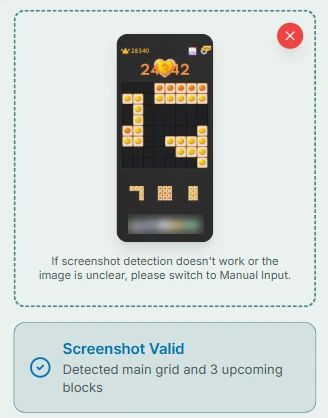
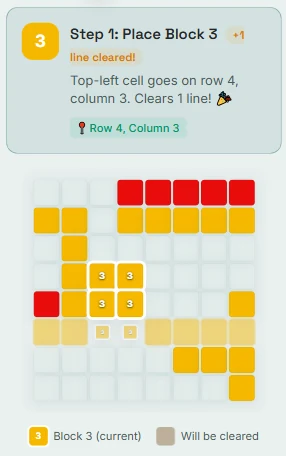
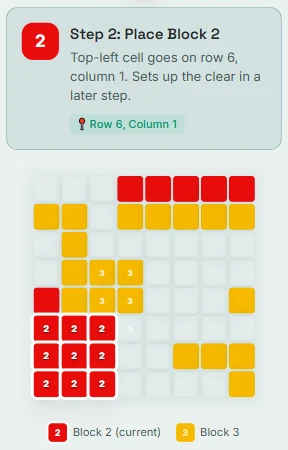
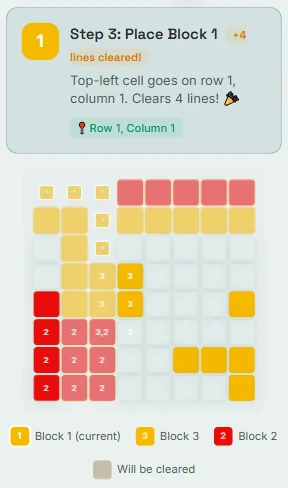
The tool found the board and all three pieces, and its plan uses every one of them. The 2x3 block goes first and clears one line. The 3x3 square goes next and sets up the last move. The hook goes last and clears four lines at once, for five lines in total.
Run the same kind of check on any tool you try: compare the board in its answer with your real board before you trust the move.
How We Tested It, and What It Cannot Do
We checked the screenshot reader on several real game boards in different color and picture themes, and it read all of them correctly. That is a limited test, not a guarantee. A cropped, blurry or unusual screenshot can still be read wrong, which is why the Modify button is there.
For the moves, the tool tries your pieces in every order and compares the spots where each one fits. It puts placing all of your pieces first, then cleared lines, then how open the board is left. On a very open board it compares only the most promising spots, so it stays fast. It cannot see which pieces the game will give you next, so its answer is a plan for the pieces on your screen, not a promise about the rest of your run.
Sometimes no order fits every piece. In that case it places what it can and tells you which piece has no spot.
Frequently Asked Questions
Which Block Blast Solver works well for Beginners?
A beginner friendly tool keeps board input simple, lets you check the detected position before committing to anything, and explains what to do next without requiring any technical background.
What Features make a Block Blast Solver useful?
Clear screenshot input, easy manual correction when detection gets something wrong, understandable move guidance, and a simple way to verify the board before you act on its suggestion.
What are the Strengths and Weaknesses of Block Blast Solvers?
Screenshot tools can be quick to use, but they depend on image quality to work well. Manual tools give you more direct control over the board, but they take longer to set up each time.
How is one Solver different from another?
The real differences come down to input method, how well the tool reads the board, how it evaluates moves, whether it explains its reasoning, which devices it supports, and how clearly it shows you the final recommendation.
Which Solver is best?
There is no single best tool for everyone. The one that suits you is the one that reads your board correctly, lets you check and fix what it detected, and explains its suggestion in a way you can follow. Be careful with rankings or accuracy numbers that come with no way to check them.
Stuck on a Board? Get the Best Move Instantly
Upload a screenshot or fill the grid manually. Our AI Block Blast Solver suggests a placement in seconds, free and with no sign-up.
Try Solver Now